

Active Directory (AD) has become a primary target for attackers launching identity-centric attacks. Fortunately, there are several tools available to help enterprise security teams get clearer visibility into their Active Directory instances and address any vulnerabilities they uncover.
One popular tool in use by analysts is Attack Path graphs, which can be used to show the possible paths an attacker can take to escalate from a standard user all the way to a highly privileged account, such as a prized Domain Admin.
While this kind of visualization can be helpful, it is no substitute for an Active Directory assessment tool that not only closes vulnerabilities but encourages best practices. To illustrate the difference, in this post we’ll compare both approaches across two example scenarios that represent common situations found in the enterprise.
Case Study: Basic Privilege Escalation
In the first scenario, we’ll look at a simple Attack Path and compare it to the results of an AD security assessment for the same issue.
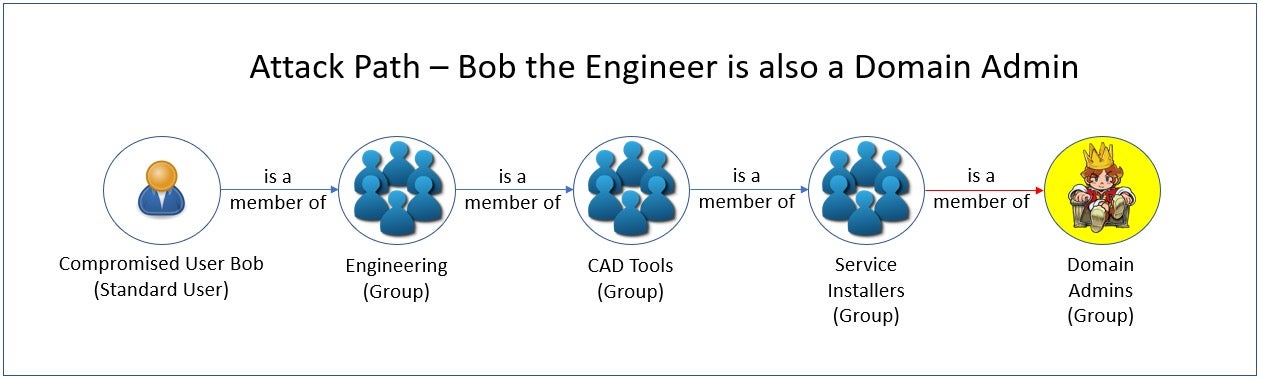
In our first example, a compromised standard user ‘Bob’ happens to be a member of a larger Engineering group, which is a subset of a CAD Tools group. Due to poor configuration and separation of privileges, this group is also a member of a Service Installers group, which itself happens to be a member of the Domain Admins group.
Clearly, even though Bob is supposed to have only Standard User privileges, this nested set of relationships allows an attacker who compromises Bob’s account to gain Domain Admin rights.
At this point, let’s explore the context an AD security assessment tool can provide in a situation like this, and how administrators might be able to use this information to mitigate this issue and prevent it from happening again.
An AD security assessment tools will provide:
- A list of all users that have privileged access. This would comprise all members from the nested groups of all privileged groups.
- A list of groups nested within the privileged group to be removed. This is the shortcut the administrator needs to mitigate the issue.
- The best practice of not nesting groups into privileged groups. This eliminates choke points so that it’s more difficult for members to be granted unintentional privileged access. This is the guidance the administrator needs to prevent the issue.
The second and third items are the most critical. If we simply removed the Service Installers group from the Domain Admins group, (along with any others that may also be nested), the compromised standard user account would no longer be a Domain Admin. By addressing the vulnerability and following best practices, administrators would no longer have to examine graphs and determine where to prune group memberships, essentially making the graph irrelevant.
Case Study: Credentials Cracking
Let’s examine another simple Attack Path.
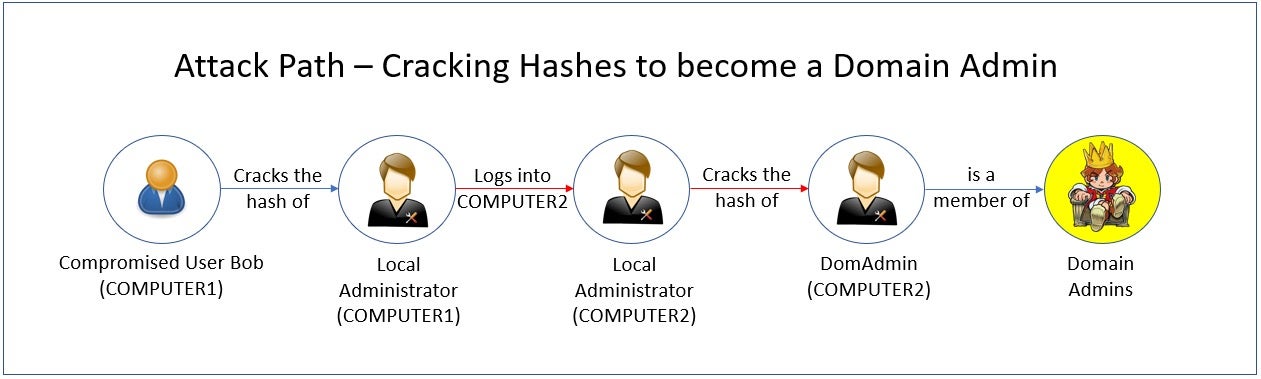
In the attack path above, a user’s computer (COMPUTER 1) has been compromised. From there, an attacker successfully cracks the computer’s local administrator account credentials. The attacker then uses that local administrator account’s password to login to another computer (COMPUTER 2), which was (mis)configured for ease of administration with the same credentials. On COMPUTER2, the attacker cracks the Domain Admin account’s hash, successfully elevating their access.
An Active Directory security assessment tool can quickly mitigate this risk by relaying the following information to an analyst:
- LAPS (Local Administrator Password Solution) was not detected to be configured in Active Directory. If it was, this would have prevented the attacker from moving from COMPUTER1 to COMPUTER2 using the same local administrator password. Making sure every local administrator account has a different, rotating password is a best practice. LAPS would meet this need.
- A Domain Admin account had logged into a workstation in the past, leaving a hash behind that the attacker could use. The best practice recommended here is to only use Domain Admin accounts to logon to domain controllers and to clear all hashes on workstations and member servers.
By following the mitigation steps and best practice recommendations of an AD security assessment tool, an administrator can eliminate the potential Attack Path of an attacker and prevent them from exploiting these misconfigurations and vulnerabilities.
Active Directory Risks That Attack Paths Miss
Attack Paths are crafted to show known attacks, whereas closing vulnerabilities eliminates both these and, often, unknown vectors, too. Consequently, it’s more important to eradicate vulnerabilities and follow best practices.
The pictures that Attack Paths paint are an incomplete representation of the actual Active Directory security situation. Graphs showing how the organization could be vulnerable are not as effective as tools that can ensure the AD infrastructure is not exposed nor will be in the future.
Below are some examples of attacks that would not be suitable for elaborate Attack Path graphs, yet it is vital for an AD security assessment to detect each of them.
- Brute force password attacks – An assessment should detect credentials which use commonly known passwords, dictionary words, or attempts to enter every possible character combination until a password has been “guessed”.
- Unconstrained delegation exposures – When an AD user or computer object has been delegated to any service using Kerberos. If compromised, this can allow the attacker to impersonate the authenticated account to any service.
- Protecting your Active Directory from AdminSDHolder attacks – Adding users or groups to the AdminSDHolder template in Active Directory that is “stamped” on every privileged user and group’s ACL, giving them rights over those accounts.
Singularity™ Identity Posture Management scans the Active Directory environment for vulnerabilities such as these and many more, guiding administrators on how to mitigate them and ensuring best practices to prevent them in the future.
Reduce Identity Risk Across Your Organization
Detect and respond to attacks in real-time with holistic solutions for Active Directory and Entra ID.
Get a DemoConclusion
While Attack Paths are interesting graphs that can enlighten administrators as to how potential attacks can take place on the network, they are no substitute for a proactive approach that eliminates known vulnerabilities and enforces best practices. Singularity Identity Posture Management finds vulnerabilities and guides administrators to close them, and keep them closed.
Active Directory Security Assessment FAQs
An AD security assessment is a detailed review of your domain’s configuration, permissions, group policies, and account settings to find weaknesses. It looks at how users, computers, and groups are structured, checks for improper rights or outdated objects, and simulates attack scenarios. You can use its findings to harden AD before attackers exploit flaws.
An AD security assessment aims to uncover misconfigurations and risky entitlements that could let attackers move laterally, escalate privileges, or harvest credentials. By mapping trust relationships, evaluating ACLs, and testing attack paths, you can prioritize fixes and reduce your organization’s attack surface before real threats emerge.
Attack path graphs visualize potential routes an attacker might take through AD based on current permissions. An AD security assessment goes beyond that: it audits configuration settings, checks compliance with security baselines, and tests those paths in practice. It combines static analysis with hands-on testing to validate which attack paths are actually exploitable.
Simply seeing possible attack paths doesn’t tell you whether controls like “deny” ACEs or monitoring alerts block them. An AD assessment tests configurations in your live environment, flags deprecated settings, and verifies which paths truly work.
That hands-on proof helps you focus on the changes that will stop real exploits instead of chasing every theoretical risk.
In one case, an assessment uncovered a forgotten service account with domain-admin privileges chained through a stale ACL. Removing that link stopped an attacker from pivoting. In another, audit checks found nested groups granting broad rights to contractors—removing those memberships closed off privilege escalation paths an adversary had planned to abuse.
AD assessments find over-permissive ACLs, unconstrained delegation, stale or high-privilege accounts, exposed service tickets, weak Kerberos settings, and gaps in group-policy security. They also spot missing patch management on domain controllers, weak LDAPS/TLS configurations, and unmonitored replication links that attackers often use for stealthy access.
Assessment tools can extract hashed credentials from LSASS, simulate Kerberoasting to request service tickets, and test weak Kerberos keys. They highlight which accounts use reversible encryption or lack hardened service principals. By pinpointing those targets, you can reset passwords, require stronger encryption, and block ticket requests that feed offline cracking.
AD is central to your network’s trust model—if it’s compromised, attackers gain wide access. Visibility into every ACL, delegation setting, and domain-controller configuration shows you where privilege escalation or lateral movement could happen. Without that clear picture, you’re left guessing at risks and may miss hidden attack routes until it’s too late.
You should run full AD security assessments at least quarterly or after major changes like migrations, domain-controller upgrades, or mergers. In-between, check key areas monthly—privileged group memberships, GPO changes, and audit logs. Regular cadence helps catch new misconfigurations before attackers discover them.
Regularly update your vulnerability data and use advanced security automation tools. Enable continuous threat monitoring, graph-based monitoring, and identity and prioritize your most critical assets. Use threat intelligence frameworks and enhance visibility across multi-cloud environments by using SentinelOne’s AI-powered security solutions.

